
ContentClaw Features
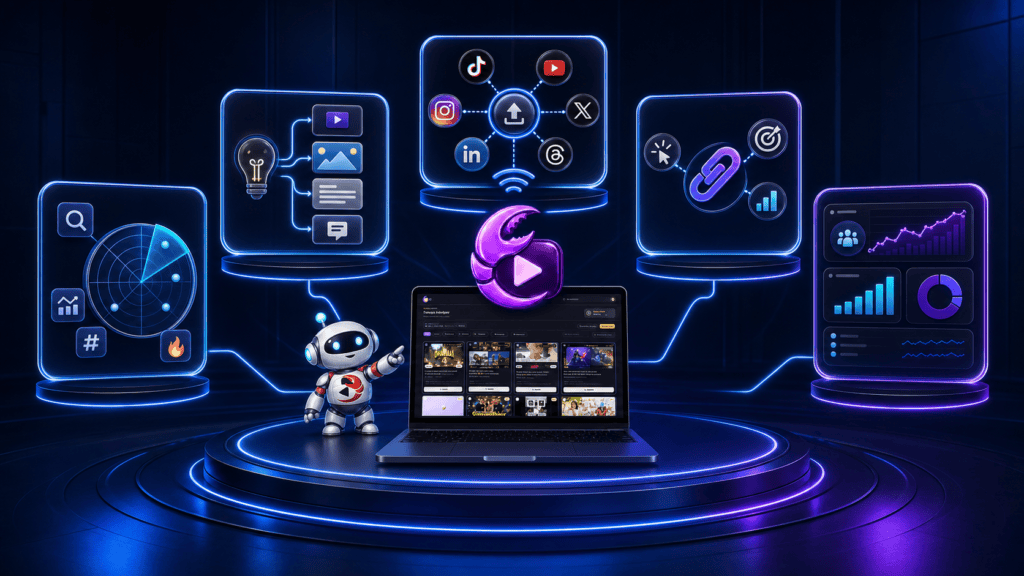
ContentClaw combines AI content research, multi-format creation, automated publishing, link placement, and audience tracking in one platform.
The software is designed to handle more than writing. It attempts to connect the entire workflow—from choosing a niche to publishing content and monitoring the resulting activity.
This guide examines the main ContentClaw features, what each one does, and where human review is still necessary.
Independent affiliate disclosure: ContentClawAI.org is not the official product website. We may earn a commission if you purchase through our links, without increasing your price.
ContentClaw Features at a Glance
| Feature | Main purpose |
|---|---|
| Niche Wizard | Creates the initial audience identity |
| TrendRadar | Finds content gaining attention |
| ContentForge | Produces platform-specific content |
| AI image generation | Creates graphics for visual posts |
| GrowthEngine | Publishes content automatically |
| Auto-monetization | Connects content to selected links |
| Money Dashboard | Tracks audience and link activity |
| Three audiences | Runs three niches simultaneously |
| RedCarpet training | Helps users set up the platform |
The front-end plan reportedly supports up to 15 publishing destinations for each audience and up to 45 posts per day across three niches.
Niche Wizard and Account Setup
The Niche Wizard handles the initial setup for a new audience.
Users can choose from more than 30 prepared niches or enter a custom topic. ContentClaw then reportedly generates:
- Account name
- Avatar or logo
- Profile biographies
- Basic brand positioning
- Hosted bio page
This feature reduces the time spent staring at a blank profile. The suggested assets remain editable, so users can adjust the name, tone, and visual identity before publishing.
A prepared niche should not automatically be treated as profitable. Audience demand, competition, subject knowledge, offer quality, and platform restrictions still matter.
Three audiences included
The front-end version includes three separate niche audiences.
Each audience can have its own:
- Brand identity
- Connected accounts
- Content topics
- Destination link
- Bio page
- Dashboard data
This makes it possible to test unrelated topics without placing them under one confusing account.
Agency Unlimited expands the platform beyond the three front-end niches.
TrendRadar Viral Intelligence
TrendRadar is ContentClaw’s research component.
It reportedly scans supported destinations every six hours for posts gaining attention in the user’s selected niche.
The system examines factors such as:
- Engagement speed
- Content format
- Hook
- Emotional angle
- Topic
- Hashtags
- Trending sounds
- Monetization potential
Each identified opportunity can receive a score from 1 to 10 based on its potential connection to monetization.
The exact formula behind that score is not explained in the available product information. It should be viewed as a recommendation rather than proof that a topic will generate revenue.
Why TrendRadar may be useful
Many AI writers generate ideas without considering what an audience is currently responding to. TrendRadar starts with observable content activity.
For example, it might identify that short demonstrations are receiving stronger engagement than general tip lists in a particular niche. ContentForge can then use that pattern as a starting point.
A successful pattern is not a guaranteed result. Established accounts, new profiles, timing, competition, and originality can all affect distribution.
ContentForge Clone-Not-Copy Engine
ContentForge turns selected ideas into content formats suited to different destinations.
The software is designed to change the angle, wording, structure, and brand voice instead of reposting one identical piece everywhere.
Supported content formats
| Content format | Possible destination |
| Short-video scripts | TikTok and YouTube Shorts |
| Reels concepts | Instagram and Facebook |
| Threads | X, Threads, and Bluesky |
| Professional posts | |
| Pins | |
| Articles | WordPress and Medium |
| Q&A content | Quora |
| Community posts | |
| Channel updates | Telegram and Discord |
| AI-generated graphics | Visual social platforms |
One idea may become several different assets. A video hook could become a thread, carousel, pin, article, and community post.
This is more useful than copying the same caption everywhere because each platform has its own format and audience expectations.
Brand voice and originality
ContentForge reportedly adapts content to the buyer’s selected brand voice.
Users should still review the output for:
- Factual errors
- Generic language
- Unsupported claims
- Incorrect tone
- Similarity to the source
- Misused images or trademarks
- Platform-specific problems
The phrase “clone-not-copy” describes the intended process. It does not remove the user’s responsibility to confirm originality.
GrowthEngine Autopilot Publishing
GrowthEngine distributes the content to connected destinations.
Users must connect at least three accounts and can use up to 15:
- TikTok
- YouTube Shorts
- X
- Threads
- Bluesky
- Medium
- Quora
- Telegram
- WordPress
- Discord
Major platforms reportedly use official account connections, while browser-based publishing may be used elsewhere.
Automatic fallback
If an API publishing attempt fails, ContentClaw advertises an automatic fallback method.
This may reduce silent publishing failures, but users should still monitor the activity feed. Platforms can change their APIs, login systems, security requirements, and automation rules.
Publishing volume
The front-end plan advertises up to 45 posts per day across three audiences.
High volume can save time when the output is accurate and relevant. It can also spread errors quickly.
Start with a manageable group of platforms. Examine the live output before activating the maximum publishing capacity.
Auto-Monetization Features
ContentClaw allows users to connect an audience to a selected “money link.”
That link can reportedly lead to:
- Affiliate offer
- Ecommerce store
- User-owned product
- Service page
- Lead form
- Client business
The label does not mean the link is guaranteed to produce money. It simply identifies the destination connected to the content.
Monetization milestones
| Audience stage | Advertised feature |
| From setup | Hosted bio page with the selected link |
| 500 followers | Automatic link insertion begins |
| 1,000 followers | Creator-program alerts begin |
| 5,000 followers | Media-kit generation becomes available |
Actual creator-program requirements vary by platform, account, country, and content type. An alert does not guarantee eligibility.
Offer rotation
ContentClaw reportedly tests multiple offers and retains stronger-performing options.
Meaningful testing requires enough accurate traffic data. A few clicks are rarely sufficient to determine which offer is better.
Affiliate Profit Engine expands this part of the system with an offer library and additional tracking capabilities.
Money Dashboard
The Money Dashboard brings the main performance information together.
It reportedly displays:
- Total followers
- Audience growth
- Link clicks
- Attributed revenue
- Performance by niche
- Publishing activity
- Monetization milestones
- Estimated account value
The dashboard emphasizes outcomes rather than a complicated content calendar.
Reported revenue should be compared with affiliate-network, ecommerce, or payment records. A dashboard can display available tracking data, but it cannot always prove which individual post caused a transaction.
Estimated account values should also be treated as estimates rather than guaranteed sale prices.
Training and Bonuses
ContentClaw includes RedCarpet onboarding and several supporting resources:
- Live white-glove onboarding
- Audience Profits Bootcamp
- First 1,000 Followers Blueprint
- Evergreen 20 offer sheet
- Community access
- Account Flipper’s Valuation Guide
These resources may help beginners understand the workflow. They do not guarantee followers, commissions, or other financial results.
Front-End Features Versus Upgrades
The central ContentClaw features are included with the front end. Optional upgrades add specialized capabilities.
| Product level | Additional capabilities |
| Front end | Three niches, research, content creation, publishing, monetization, dashboard, and training |
| Affiliate Profit Engine | Offer library, enhanced matching, conversion content, and tracking |
| Agency Unlimited | Unlimited niches, client accounts, white-labeling, reports, and team access |
| TurboGrowth | Increased publishing, cross-promotion, priority processing, and advanced analytics |
| AI Profit Coach | Dashboard-based account recommendations |
| DFY Income Empire | Ten prepared niche properties and 90 days of content |
| FastPass | Packages the principal upgrades |
| Direct Bundle | Combines the front end and principal upgrades |
Some front-end and upgrade descriptions overlap, especially around offer rotation and media-kit tools. Confirm the exact differences before paying for an upgrade.
Visit our ContentClaw OTO page for the complete upgrade and downsell breakdown.
Compare All ContentClaw Upgrades
Important Feature Limitations
ContentClaw offers broad automation, but buyers should understand its limits:
- Trend research cannot guarantee viral results.
- AI-generated content may contain mistakes.
- Modeled content still requires an originality check.
- Platform connections can break or change.
- High publishing volume can magnify weak content.
- Link insertion cannot guarantee conversions.
- Monetization alerts do not guarantee program approval.
- Dashboard attribution may be incomplete.
- Account-value estimates are not guaranteed sale prices.
- Some technical and usage limits are not fully explained.
Automation reduces repetitive work. It does not replace strategy, editing, compliance, or audience judgment.
Final Assessment
The strongest ContentClaw feature is the connection between its tools.
TrendRadar supplies content direction. ContentForge creates several native formats. GrowthEngine handles distribution. The monetization layer connects content to a destination, and the Money Dashboard reports the resulting activity.
That integrated workflow may save considerable time for affiliate marketers, faceless creators, bloggers, and agencies.
The software should still be supervised. Users need to verify facts, protect originality, monitor connected accounts, and avoid publishing low-quality material simply because higher volume is available.
For most individual buyers, the front-end features appear to cover the main workflow. Consider an upgrade only when a specific front-end limit affects your work.
Check the Current ContentClaw Offer
ContentClaw Features FAQ
How many platforms does ContentClaw support?
It supports up to 15 publishing destinations for each audience.
How many niches are included?
The front end includes three separate niches. Agency Unlimited adds unlimited personal niches.
Does ContentClaw only create videos?
No. It creates scripts, threads, articles, pins, graphics, carousels, Q&A content, community posts, and captions.
Can ContentClaw publish automatically?
Yes. GrowthEngine is designed to publish content automatically to connected accounts.
Does ContentClaw guarantee followers or income?
No. Its features can automate work, but they cannot guarantee traffic, followers, sales, or income.